
Features
What it does, what it needs, and where it stops.
Every capability below is labeled. Some work as soon as a mailbox is connected; some need your consent or a permission first; some are not available yet.
Available nowNeeds permission or setupNot available yet
01
Security and saved copies
Exactly what is protected today, and what is not built yet.
Limits worth knowing
- Ordinary Gmail mail is not end-to-end encrypted.
- Offline copies are read-only: no attachments, HTML or sending, and not the full app. Unlocking needs a successful online check within the last seven days.
- Forgotten offline passphrases cannot be recovered. Encryption does not protect an unlocked or compromised device.
- Signed desktop installers are not available.
- Per-mailbox Google permissionAvailable now
- Each mailbox is authorized through Google on its own. PonyXpress never asks for your Google password; disconnect any mailbox independently.
- Remote images blockedAvailable now
- Images hosted by senders stay off by default until you choose to load them.
- Encrypted offline text copiesNeeds permission or setup
- Opt in and select loaded conversations: up to 50 threads, 200 messages and 8 MiB of text, locked by a separate passphrase, kept 1, 7 or 30 days. Read them in the prepared /offline/ reader.Needs: Opt-in in Settings, Offline reading, while signed in and online, and a supported browser.
- End-to-end encrypted messagingNot available yet
- Not available yet. A fictional design preview shows the planned flow only: no encryption, authentication or delivery.
02
Scout Ride Ahead
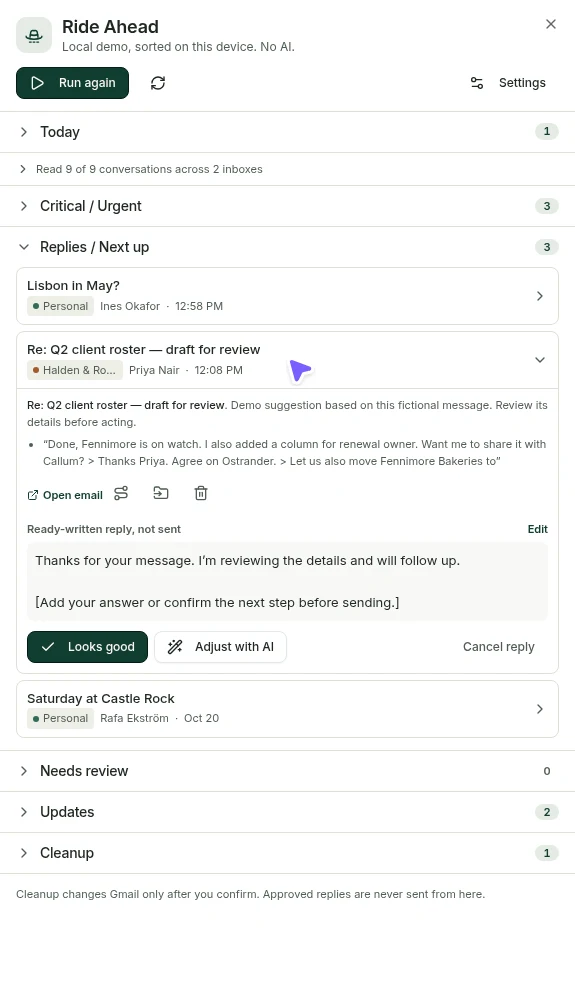
An inbox-wide catch-up report you start and review.
Limits worth knowing
- Live cloud assistance requires adult eligibility, configured AI and the relevant purpose-specific consent plus selected mailbox/action grants. Reports can be partial when daily processing allowances are reached; the report says so.
- Scout does not guarantee it found everything important, and it never sends mail.
- Attachments are not sent to AI, except a PDF you individually select and confirm under the separate Scout Voice PDF permission. Content goes to OpenAI under its standard API policy; see the Privacy Notice.
- The demo shows simulated results and never calls AI.
- Manual catch-up reportNeeds permission or setup
- Run it when you want. Results are grouped with counts, urgent items first, each linked to its source conversation.Needs: Separate Ride Ahead consent, and cloud AI configured on this server.
- Optional run at sign-inNeeds permission or setup
- Choose to have Scout run once per signed-in session. It does not run on a background daily schedule.Needs: Opt in under Ride Ahead settings.
- Reply drafts for reviewNeeds permission or setup
- Edit a suggested draft, then choose Looks good to record your approval. Looks good does not send; you send from the composer.
- Reviewed cleanupNeeds permission or setup
- Suggestions start unselected and are grouped by mailbox. File or trash up to 25 conversations per reviewed batch.
- One-message summariesNeeds permission or setup
- Ask Scout about a single conversation. This uses its own consent, separate from inbox-wide analysis.Needs: Conversation AI consent in Settings, Privacy.
03
Scout Voice
Optional talk-to-email inside Ride Ahead. Never always-on.
Limits worth knowing
- The packaged desktop app blocks the microphone and offers typed sessions instead.
- Never always-on, never sends mail, never used on secure or encrypted content.
- Audio, transcripts and PDF content go to OpenAI under its API policy; this is not a zero-retention promise. See the Scout Voice guide.
- Talk it throughNeeds permission or setup
- Choose a mailbox and catch-up interval, then ask about what arrived. Typed sessions work too.Needs: Ordinary Scout consent, adult cloud AI eligibility, a configured AI provider, and purpose, account and action grants.
- Record or converseNeeds permission or setup
- Record a clip up to 30 seconds and review its transcript, or choose Start conversation to submit spoken questions on pause and listen after Scout answers. A visible indicator and End conversation control stay available. Raw recordings are not kept; mail changes still need confirmation.Needs: Separate saved transcription opt-in. Conversation mode also needs a chosen speech output. Microphone support depends on browser and device.
- Natural or on-device read-aloudNeeds permission or setup
- Natural OpenAI read-aloud is its own opt-in. An on-device voice stays local. A failed AI voice never silently falls back.Needs: Separate saved read-aloud opt-in for the natural voice.
- Selected PDF reviewNeeds permission or setup
- Ask about a PDF you select and confirm: the first six pages, up to 8 MB.Needs: Separate saved PDF opt-in plus confirmation per attachment.
- Proposals saved as draftsNeeds permission or setup
- Reply and forward proposals become drafts only after you confirm recipients and contents. Only the composer sends.
04
Accounts and unified mail
Gmail and Google Workspace mailboxes, side by side and clearly labeled.
Limits worth knowing
- Gmail and Google Workspace only; other providers are not supported.
- Workspace administrators can restrict third-party access to a mailbox.
- All inboxes with account badgesAvailable now
- Every conversation shows the name and color of its account. Switch to one account at any time from the account rail.
- Connect each mailbox separatelyNeeds permission or setup
- Each Gmail or Workspace mailbox is authorized on its own through Google. Your PonyXpress sign-in is separate from mailbox permission.Needs: Free PonyXpress account, agreement, and Google authorization per mailbox. Depends on this server’s Google setup.
- Collapsible conversationsAvailable now
- Long threads collapse so you can see who said what last.
- Familiar folders and searchAvailable now
- Inbox, Starred, Sent, Drafts, Archive and Trash, with search including attachment file names.

05
Writing as the right person
Identity follows the account, all the way to Send.
Limits worth knowing
- Send-as addresses must already be verified in Gmail.
- Gmail signature import or export needs optional Gmail settings permission; signatures do not sync automatically.
- Scheduled sends and snooze returns need server processing to run. The demo simulates delivery.
- Gmail signature export works for the primary address only.
- An accepted unsubscribe request is not guaranteed removal; there is no Undo, and website or email methods stay manual.
- Per-account signaturesAvailable now
- Separate defaults for new mail and replies, per account or per verified Gmail send-as address.
- Sending addressesAvailable now
- Replies come from the receiving account. Verified Gmail send-as addresses can be chosen per account.
- Rich signaturesAvailable now
- Formatted signatures with logo images in the editor.
- SnoozeAvailable now
- Snooze a conversation to a chosen time in your time zone; it waits in Snoozed, then returns.
- Reviewed unsubscribeAvailable now
- Select conversations and review each sender, domain and method. One confirmation covers only verified one-click requests.
- Scheduled send and Undo sendAvailable now
- Schedule a message for later, or take it back during a short window after pressing Send.
06
Mailbags and Routes
Organization that lives in Gmail, not only in PonyXpress.
Limits worth knowing
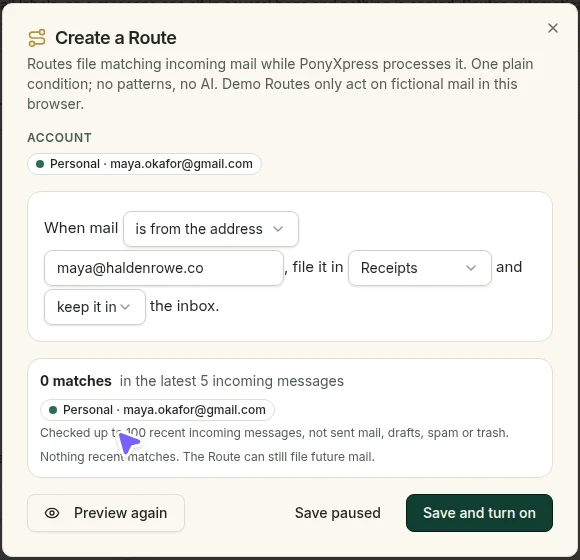
- Routes apply only the filing you configured, to mail arriving while PonyXpress processing runs.
- Saving a Route does not automatically refile older mail.
- MailbagsAvailable now
- Mailbags are Gmail labels in each account, so they show up in Gmail too.
- RoutesAvailable now
- Rules by exact sender, sender domain or subject text that file new matching mail into a Mailbag, optionally skipping the inbox. You preview matches before saving.
- Reviewed filing of existing mailAvailable now
- Select conversations and file them as a separate, reviewed action.
07
Events, reminders and contacts
Turn an email into a next step you have checked, linked back to its source.
Limits worth knowing
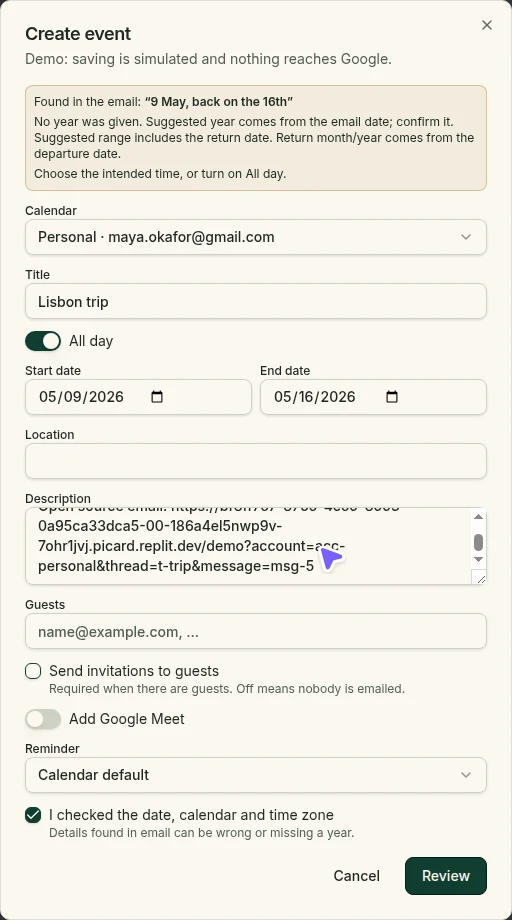
- Dates read from email can be wrong; always check them and the time zone before saving.
- Invitation import supports one non-recurring event per file; some time zone formats fail instead of guessing.
- Alerts also need eligible background hosting and server configuration. Delivery depends on the browser, OS and device being online; it cannot be guaranteed.
- Earlier calendar-based reminders remain unchanged; new private reminders do not sync to Google Calendar or Google Tasks.
- Events from emailNeeds permission or setup
- Underlined dates and Scout suggestions open an editable event draft: title, time, time zone, location and optional guests.Needs: Google Calendar permission for that account. Invitations are sent only if you choose.
- Private remindersAvailable now
- Task alarms kept in PonyXpress with Snooze, Mark done and a link to the source email. Not Google Calendar events or Google Tasks.
- Reminder and calendar alertsNeeds permission or setup
- Notifications on enrolled devices, with quiet hours.Needs: Device enrollment and browser/OS notification permission.
- Invitations and meetingsNeeds permission or setup
- Review a simple .ics invitation and save a copy to a calendar you choose. Add Google Meet or paste an existing Zoom link.Needs: Writable calendar with Calendar permission. Importing is not an RSVP; PonyXpress does not create Zoom meetings.
- Contacts from emailNeeds permission or setup
- Review a sender’s details and save them to the account you choose. Sharing between accounts starts with a preview.Needs: Google Contacts permission for that account.
08
Where it runs
The browser today. Desktop when it is ready.
Limits worth knowing
- No public desktop installer exists yet. Anything claiming to be one is not from us.
- Web appAvailable now
- Any modern browser on desktop, tablet or phone. Nothing to install.
- Fictional demoAvailable now
- Try the workspace with made-up accounts, no sign-in.
- Mac and Windows appsNot available yet
- Installers will be listed on Downloads only after they are signed and tested.
Walk through it with fictional mail first.
Or read the worked examples on the homepage.
- Free to use
- No payment required